Choose what to replace.
Paste text or import a webpage selection. Scan supported patterns and add your own names or references as literal rules.
LOCAL TEXT REVIEW FOR CHROME
Replace details you choose with consistent aliases. Copy a reviewed prompt to your AI tool, then restore known aliases in its reply.
Chrome desktop · Browser memory · No account
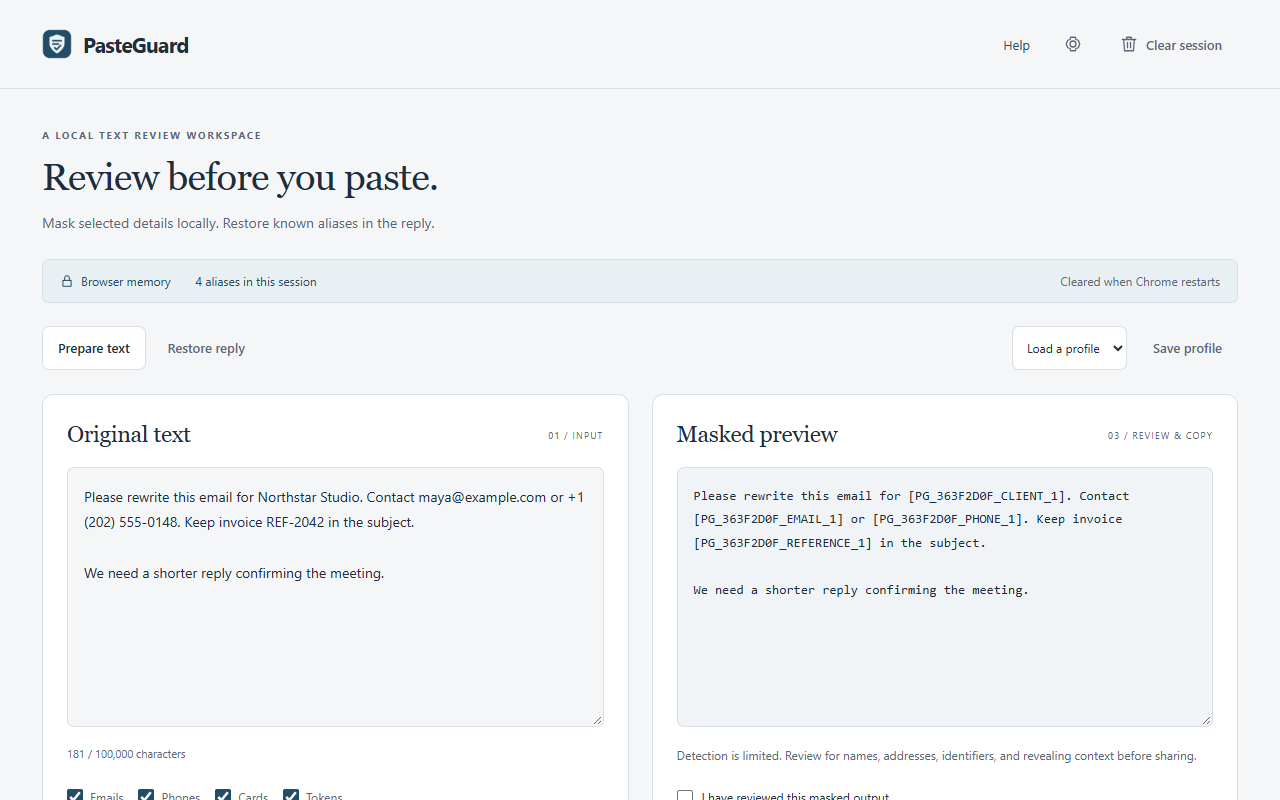
Draft a reply for Northstar Studio.
Email maya@example.com.
Draft a reply for [PG_A1B2C3D4_CLIENT_1].
Email [PG_A1B2C3D4_EMAIL_1].
Illustrative data. Pattern detection can miss identifying context.
A WORKFLOW YOU CONTROL
Paste text or import a webpage selection. Scan supported patterns and add your own names or references as literal rules.
Approve individual replacements, read the full output, and copy it to the tool you choose. PasteGuard does not submit prompts.
Paste the reply into the same session. Restore exact known aliases and review any unknown or altered alias text.
A VISIBLE REVIEW STEP
Use the side panel while browsing or open a full workspace. Match suggestions are editable choices; names and other context may need your own rules.
MEMORY SESSION
Inputs and alias originals use browser memory. Browser restart clears the mapping and custom rules. Only appearance, detector choices, and built-in profile labels persist locally.
PasteGuard does not guarantee anonymization. Review names, addresses, identifiers, and context yourself.
Check detection coverage