 PasteGuard
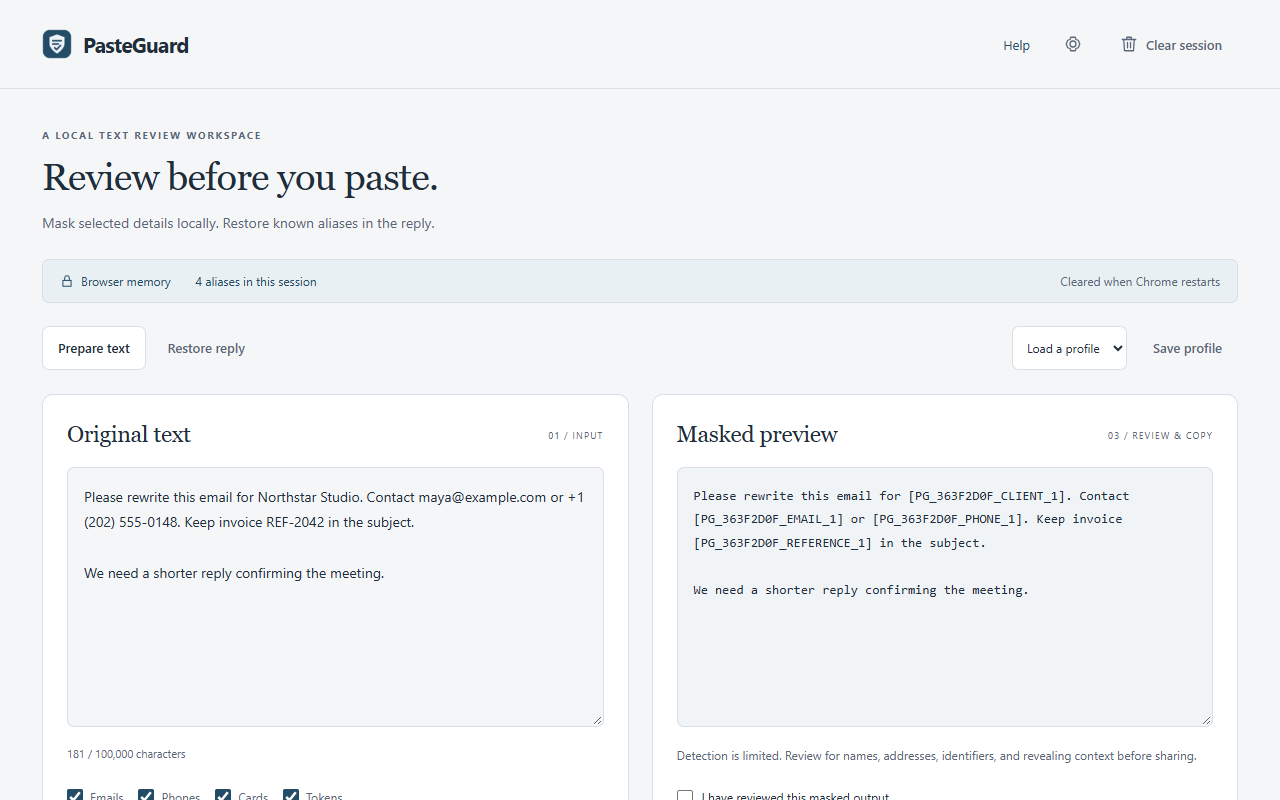
Inspect a local scan
Paste text into PasteGuard and review the suggested detections. Temporary literal rules let you mark a client name or another exact phrase that a general detector may miss.
Use aliases with context
Review the replacement aliases before copying the masked text. Keep enough context for the recipient while removing details you do not want to share.
Restore a reply on your device
Bring the reply back to the same workflow to restore aliases locally. Pro stores client presets in encrypted form with an explicit unlock and supports encrypted preset import and export.
Included in Free
Local scan, temporary literal rules, review, aliases, copy and reply restore; ten non-sensitive detector profiles. No daily quota for basic use.
Optional Pro
Up to 25 encrypted client presets with 50 literal rules each, explicit unlock, alias preferences and encrypted preset import/export.
A client question for an AI chat
Replace the client name and account details in a draft before copying it to an external chat. Inspect the whole draft as well as the highlighted detections, then restore aliases in the returned answer.
Before you begin
Detectors can miss sensitive information and can flag harmless text. Review every result. Masking is not a guarantee of anonymity or compliance; the service you paste into has its own data policy.